Unicorn SVG Files: What You Actually Need to Know Before Downloading
Unicorn SVG files are among the most popular digital design assets for crafters, educators, small business owners, and content creators—but not all sets deliver what they promise. If you’ve ever opened a downloaded ZIP only to find mismatched file types, blurry previews, or formats that won’t load in your cutting machine software, you’re not alone. The issue isn’t usually the unicorn theme—it’s how the files were prepared, packaged, and documented.
What “Unicorn SVG Files” Really Means (and Why It Matters)
At its core, Unicorn SVG Files refers to a collection of scalable vector graphics centered around unicorn motifs—horns, manes, rainbows, stars, and whimsical typography—all built for flexibility across platforms and devices. Unlike raster images (like standard JPGs), SVG files retain crisp edges at any size, making them ideal for vinyl cutting, print-on-demand mockups, classroom posters, or social media overlays. But scalability alone doesn’t guarantee usability—especially when multiple file formats are involved.
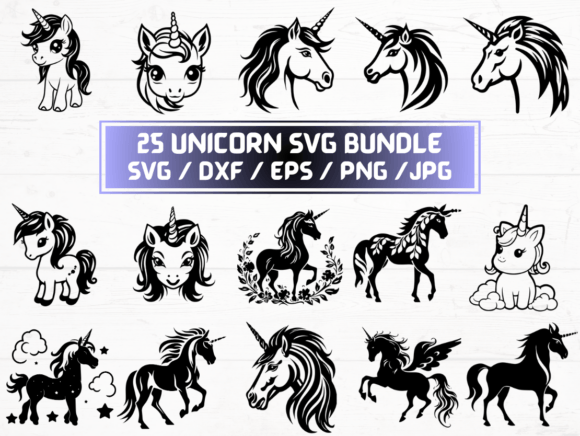
This particular listing includes 25 SVG files, plus matching 25 PNGs (300 dpi with transparent background), 25 DXF files, 25 JPGs, and 25 EPS files—all delivered as an instant digital download. That breadth is useful—but only if each format serves a real purpose in your workflow.
Common Missteps—and How They Slow You Down
Mistake #1: Assuming “SVG” means “ready for Cricut or Silhouette.”
Not all SVG files are optimized for cutting machines. Some include embedded raster images, ungrouped layers, or complex clipping masks that cause errors during import. Others use unsupported fonts converted to outlines incorrectly—leading to missing details or jagged edges. A quick test: open the SVG in your design software and check whether all elements appear as editable paths—not flattened images.
Mistake #2: Overlooking DPI and transparency in PNGs.
Many users assume “PNG” automatically means high-res and transparent—but that’s not guaranteed. Low-resolution PNGs (e.g., 72 dpi) pixelate when printed or scaled. And if the background isn’t truly transparent (sometimes saved as white instead), overlays won’t layer cleanly over photos or colored backgrounds. This listing specifies 300 dpi with transparent background, which is ideal for professional printing and digital compositing—so verify that detail before purchase.
Mistake #3: Confusing DXF with SVG—or worse, using DXF when you need SVG.
DXF files work well with some CNC tools and older versions of Silhouette Studio, but they don’t support color layers, gradients, or text styling like SVGs do. If your project involves multi-color vinyl layering or animated web use, SVG is the smarter choice. Using DXF unnecessarily adds conversion steps—and risks losing precision.
What to Check Before You Click “Buy”
Before downloading any Unicorn SVG Files, scan for these practical indicators of quality:
- Preview accuracy: Do the on-screen thumbnails match the actual file contents? Look for zoomed-in samples—not just stylized banners.
- Software compatibility notes: Reputable sellers specify tested platforms (e.g., “Works with Cricut Design Space v7+”, “Tested in Adobe Illustrator CC 2023”). Vague claims like “universal format” often hide limitations.
- Layer organization: Open one SVG in a vector editor. Are elements grouped logically? Can you easily isolate the horn from the mane? Poorly structured files waste time ungrouping or redrawing.
- Licensing clarity: Does the description state whether files can be used commercially—for example, on Etsy products or client branding? Personal-use-only restrictions matter if you run a small business or freelance design service.
For instance, a teacher creating printable unicorn-themed behavior charts needs clean, labeled SVG layers and high-res PNGs for Google Slides. A t-shirt entrepreneur needs commercial rights and vector files that scale flawlessly to chest- or back-print sizes. Neither benefits from oversized EPS files meant for legacy print shops—or PNGs without transparency.
Better Choices Start With Intentional Use
Ask yourself: What’s my next step with these files? That question guides everything—from which format to open first, to whether you even need all 25 designs.
If you're new to digital crafting: Start with the SVGs. They’re the most versatile starting point—editable in free tools like Inkscape or browser-based editors like Vectr. Resize, recolor, and combine elements without quality loss. Once you’re comfortable, explore DXF for precise cutting or EPS for sharing with professional printers.
If you're building branded assets: Prioritize the PNGs. Their 300 dpi resolution and transparent backgrounds integrate smoothly into Canva, PowerPoint, or Shopify product pages—no extra editing needed. Save EPS for final handoff to a print vendor who requests it explicitly.
If you're managing tight deadlines: Skip listings that bundle every format without clear guidance. Instead, choose sets like this one—where file counts align (25 of each type), naming is consistent (e.g., unicorn-horn-01.svg, unicorn-horn-01.png), and metadata is included. Consistency saves minutes per file—hours over dozens of projects.
Why Format Balance Beats Quantity Alone
It’s tempting to chase “more files”—but 100 poorly exported SVGs are less valuable than 25 thoughtfully built ones. This Unicorn SVG Files package avoids bloat by delivering equal counts across key formats, eliminating guesswork about conversions. No need to wrestle with online converters that degrade line fidelity or strip transparency. No last-minute panic because your Cricut rejected the EPS file you assumed was interchangeable.
That reliability extends beyond technical specs. Because these are digital-only files—no physical item shipped—you get immediate access. That’s essential for educators preparing Monday morning lessons, marketers launching weekend campaigns, or hobbyists jumping into a Friday night craft session. Just download, extract, and go.
Remember: Great design resources don’t shout. They simplify. They anticipate roadblocks. They respect your time and tools. When you choose Unicorn SVG Files with attention to structure, resolution, and real-world use—not just aesthetics—you invest in smoother workflows, sharper outputs, and fewer “why won’t this work?!” moments.