Tree SVG: What You Actually Need to Know Before Downloading
If you're searching for Tree SVG files—whether to cut with a Cricut or Silhouette, layer into Canva designs, add to educational printables, or embed in a Shopify banner—you’re not just looking for “a tree.” You’re looking for the right kind of tree: one that scales cleanly, imports without glitches, works across your tools, and saves you time—not headaches.
What “Tree SVG” Really Means (Beyond the Buzzword)
An SVG (Scalable Vector Graphic) is a math-based file format. Unlike JPGs or PNGs, it doesn’t pixelate when enlarged—it redraws itself at any size. A Tree SVG is simply a vector representation of a tree shape: trunk, branches, leaves, sometimes roots or seasonal variations. But here’s what many overlook: not all Tree SVG files are created equal. Some contain embedded raster images, ungrouped layers, inconsistent stroke/fill behavior, or even hidden objects that crash cutting software.
This matters because if you buy a Tree SVG expecting clean cuts—and your machine stalls mid-cut due to stray anchor points or overlapping paths—you’ve lost time, material, and confidence—not just money.
Mistake #1: Assuming “SVG” Means “Ready to Use Everywhere”
SVG support varies wildly. Cricut Design Space handles most SVGs well—but only if they’re simplified and lack unsupported features like gradients or complex clipping masks. Silhouette Studio (especially free versions) may reject SVGs with embedded fonts or non-standard path syntax. And web platforms like WordPress often require inline SVG code or proper attributes to render correctly.
Better approach: Before downloading, check the product description for compatibility notes. Look for phrases like “Cricut-ready,” “Silhouette-tested,” or “web-optimized.” If none appear, assume extra cleanup may be needed—and factor that into your decision.
Mistake #2: Overlooking File Structure and Layer Organization
A single Tree SVG might look fine at first glance—but open it in Inkscape or Illustrator and discover 47 grouped layers, invisible guides, or text objects converted to outlines using outdated methods. That makes customizing colors, removing branches, or adapting the design for a child’s worksheet unnecessarily difficult.
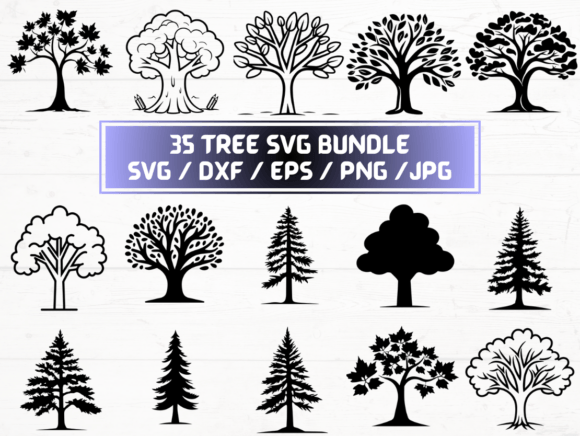
Better approach: Choose bundles that explicitly state “clean layers,” “named groups,” or “editable elements.” The listing you’re viewing includes 35 SVG files—each designed with consistent structure and intentional grouping. That means swapping leaf color takes two clicks, not twenty minutes of hunting through nested layers.
Mistake #3: Ignoring Output Format Limitations
You might need an SVG for your cutter—but also a high-res PNG for a brochure, a DXF for laser engraving, or an EPS for professional print shops. Relying on one format forces workarounds: converting SVG to PNG yourself risks blurry edges; exporting from a low-DPI source ruins crispness.
Better approach: This bundle delivers all five core formats—SVG, DXF, EPS, PNG (300 dpi, transparent background), and JPG—for every single tree design. No guesswork. No re-exporting. Just select the right file for your tool and workflow.
Mistake #4: Skipping the “Transparent Background” Check
Not all PNGs come with transparency—even if the seller says they do. Some are saved with white or black backgrounds baked in. That’s fine for social media posts but disastrous for layered scrapbooking, t-shirt mockups, or digital lesson slides where you need the tree to sit naturally over photos or textures.
Better approach: Verify transparency by opening a sample PNG in any image viewer that shows checkerboard backgrounds (like Preview on Mac or Paint.NET on Windows). This bundle guarantees 300 dpi PNGs with true alpha transparency—no surprises, no editing required.
What to Confirm Before You Click “Buy”
- Instant delivery method: Is it truly ZIP download—or email-based with delays? This listing offers immediate access after purchase, no waiting.
- Format consistency: Are all 35 designs available in every format—or just some? Here, each tree appears in all five formats, uniformly named and organized.
- Commercial use clarity: Can you use these for client projects, print-on-demand, or selling physical goods? Always read the license—even if it’s not highlighted. This bundle permits both personal and commercial use (with standard attribution-free terms).
- Software version notes: Older SVGs may not behave in newer versions of design apps. Bundles updated within the last 12–18 months typically follow current best practices for path simplification and attribute naming.
Real-World Use Cases—Where This Bundle Fits Smoothly
A homeschooling parent building nature-themed flashcards? Grab the SVG for clean vinyl cuts or the PNG for crisp PDF handouts. A small business owner designing eco-friendly packaging? Use the EPS for offset printing and the DXF for embossed texture templates. A blogger illustrating a post about sustainability? Drop the transparent PNG straight into Canva—no background removal needed.
The key isn’t just having more files—it’s having interchangeable, reliable, production-ready files. That’s why this set includes 35 distinct tree variations: evergreen, willow, birch, bonsai, autumn maple, minimalist line art, and more—not just repeats with different colors.
One Final Note on Value
It’s tempting to grab a free Tree SVG from a random blog or forum. But those often lack licensing clarity, contain watermarks, or use outdated vector standards that break in modern software. Others cost $5–$10 for just 5 designs—leaving you to hunt for matching formats elsewhere.
This bundle gives you 35 complete, professionally prepared tree designs—each delivered in SVG, DXF, EPS, PNG (300 dpi + transparent), and JPG—instantly, without subscription or upsell. It’s not about quantity alone. It’s about eliminating friction so your focus stays where it belongs: creating, teaching, selling, or sharing—not troubleshooting file errors.
If you’ve ever spent 20 minutes trying to isolate a branch from a messy SVG, or printed a PNG only to find jagged edges, or uploaded a file only to see “unsupported format” pop up—that’s the kind of waste this collection helps you skip. Not with hype. Not with promises. Just clean files, clear formats, and real-time usability.