Strawberry SVG: Creative Files for Designers & Makers
Strawberry SVG isn’t just a cute graphic—it’s a versatile, production-ready design asset built for real work. Whether you’re screen-printing t-shirts for a farmers’ market stall, designing lesson materials for elementary science class, or building a branded social media campaign around summer freshness, these files deliver consistency, clarity, and creative control—right out of the ZIP folder.
What You’re Actually Getting (and Why It Matters)
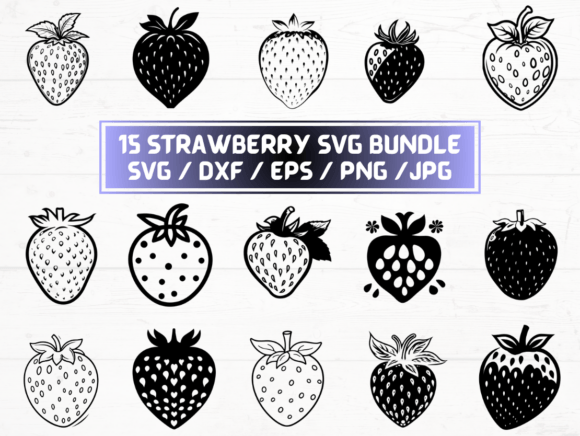
This listing includes 5 file types—SVG, PNG, DXF, JPG, and EPS—each serving a distinct role in your creative workflow. The 15 designs aren’t generic clipart; they’re thoughtfully crafted strawberry motifs with clean vectors, balanced proportions, and intentional negative space. That means no jagged edges when scaled, no pixelation when printed large, and no guesswork when importing into Cricut Design Space, Silhouette Studio, Adobe Illustrator, or Canva.
The 300 dpi PNGs with transparent backgrounds? They’re ready for web banners, email headers, or digital presentations—no background removal needed. The DXF files are optimized for laser cutters and vinyl cutters, supporting precise layering and contour cutting. EPS files retain full editability in vector-based publishing tools, while JPGs offer lightweight options for quick mockups or blog illustrations.
Creative Applications That Go Beyond “Cute”
A strawberry motif carries instant recognition—but its usefulness expands dramatically when matched to purpose. Here’s how different users apply Strawberry SVG meaningfully:
- Small business owners use the outlined strawberry icon as a subtle watermark on product packaging labels—clean, scalable, and brand-aligned without overwhelming the design.
- Educators print the simplified, bold-outline versions onto cardstock for life-cycle sorting activities (blossom → green fruit → ripe strawberry), then laminate them for repeated classroom use.
- Freelance designers combine one of the layered SVG files with custom typography to create seasonal Instagram Story templates—think “Summer Recipe Series” with a strawberry as both bullet point and visual anchor.
- Hobbyists import the DXF files directly into Glowforge or Cricut software to cut strawberry-shaped wood coasters, acrylic keychains, or felt appliqués—with consistent sizing across all 15 variations.
- Bloggers and content creators insert the PNGs into Canva layouts for Pinterest-optimized infographics about seasonal nutrition, pairing each strawberry icon with a fact (“Rich in vitamin C—1 cup delivers 149% of your daily value”).
Adapting Style Without Losing Clarity
Not every project needs the same strawberry. That’s why this collection includes variations—some with stems and leaves, others minimal and geometric; some with soft shading, others flat and bold. You don’t need to start from scratch to match tone or audience.
For a modern wellness brand, choose the sleek, stemless outline and pair it with muted sage and cream. For a children’s sticker pack, go with the version that includes glossy highlights and a friendly leaf curl—then export as PNG for easy upload to print-on-demand platforms. If you're designing signage for a local U-pick farm, use the EPS file in CorelDRAW to adjust stroke weight for readability at 10 feet.
The key is restraint: pick one variation per project and maintain consistent scale, color treatment, and placement logic. Overloading a layout with multiple strawberry styles dilutes impact. One well-chosen Strawberry SVG—used intentionally—is more effective than five scattered interpretations.
Practical Tips for Consistent, Professional Results
Before jumping into editing, take two minutes to organize:
- Name your layers—especially if you’re ungrouping an SVG in Illustrator. Label “stem,” “leaf,” “fruit base,” and “highlight” so edits stay predictable across projects.
- Check color mode before printing. CMYK for physical products (tote bags, postcards); RGB for digital use (websites, social posts). The EPS and SVG files support both—just confirm your document settings first.
- Test cut small before running a full batch on your vinyl cutter. Use the DXF file at 2" wide to verify blade depth and material feed—especially important for textured papers or thin balsa wood.
- Preserve transparency when saving edited PNGs. In Photoshop, avoid “Save As”—use “Export > Export As” and keep the Transparency box checked. In GIMP, export as PNG and ensure “Save transparency” is enabled.
Why Digital-Only Delivery Is a Practical Advantage
This is a digital product—no shipping, no inventory, no waiting. You get immediate access after purchase, which matters when inspiration strikes mid-project or a client request lands with a tight deadline. More importantly, it means you control versioning: download once, store securely, reuse across years and platforms without licensing friction.
There’s no subscription, no usage cap, and no attribution requirement—just clean, commercial-use-ready files you own outright. That flexibility supports long-term creative sustainability: the same Strawberry SVG that decorates your Etsy shop banner today can become part of a workshop handout next spring or a slide in your annual team presentation.
Getting Started Is Simpler Than You Think
You don’t need advanced software to begin. Open the SVG in a free tool like Inkscape or Vectr to resize, recolor, or export as PNG. Drag the JPG into PowerPoint or Google Slides for quick presentations. Import the DXF into Cricut Design Space in under 10 seconds—no conversion needed.
If you’re new to vector files, start small: replace a stock photo in a newsletter with one of the PNGs. Then try changing its color using the “Recolor Artwork” tool in Illustrator—or even the built-in color picker in Canva. Each step builds familiarity without pressure.
What makes Strawberry SVG valuable isn’t complexity—it’s reliability. It’s knowing that whether you’re designing for screen, print, or physical fabrication, you have a set of assets that behave predictably, scale cleanly, and support your goals—not distract from them.