Star SVG Files
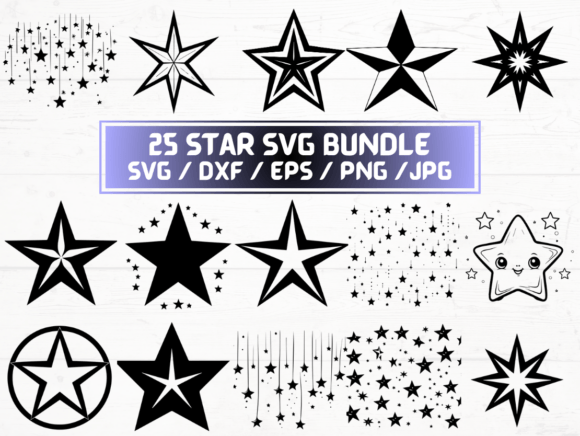
Star SVG Files refer to a digital collection of star-themed design assets delivered in multiple vector and raster formats—including SVG, DXF, EPS, PNG, and JPG. This particular listing offers 25 unique star designs, each provided across five file types, totaling 125 individual files bundled into a single ZIP folder. It is an instant-download digital product: no physical item is shipped, and access is granted immediately after purchase.
SVG (Scalable Vector Graphics) files are resolution-independent, meaning they retain crisp edges at any size—ideal for cutting machines, web graphics, or scalable print layouts. DXF (Drawing Exchange Format) files are widely supported by CNC routers, laser cutters, and CAD software. EPS (Encapsulated PostScript) remains compatible with professional design tools like Adobe Illustrator, especially for legacy workflows. PNG files arrive at 300 dpi with transparent backgrounds—suitable for overlays, digital scrapbooking, or web use where background removal is essential. JPG files provide standard raster compatibility but lack transparency support.
People commonly seek Star SVG Files for craft projects, signage, apparel decoration, classroom materials, or digital design work. The consistent theme—25 distinct star motifs—supports cohesive visual branding or themed collections. Because the set includes both vector and high-resolution raster options, users with varying software access or technical comfort levels can find usable assets without needing to convert or edit files extensively.
One benefit is format versatility. A user operating a Cricut or Silhouette machine can import SVG or DXF files directly; a graphic designer preparing marketing collateral may prefer EPS or high-res PNGs; an educator building presentation slides might rely on transparent PNGs for clean layering. The inclusion of 300 dpi PNGs specifically addresses common needs for print-ready clarity without requiring manual resizing or background removal.
However, there are tradeoffs. While 25 designs offer variety, the collection is narrowly focused on stars—meaning it lacks complementary elements like borders, banners, or supporting icons. Users seeking full thematic kits (e.g., “space party” or “military award”) may need to supplement this set with additional assets. Also, because these are pre-made files—not customizable templates—users who require specific proportions, line weights, or stylistic adjustments (e.g., turning a filled star into an outline-only version) will need basic vector editing skills or software capable of modifying paths.
Another consideration is software compatibility. Though SVG is broadly supported, older versions of some programs may render certain effects (like gradients or embedded fonts) inconsistently. DXF files, while widely accepted, sometimes require manual cleanup in CAD environments due to differences in how layers or stroke definitions are interpreted. EPS files remain reliable in professional print workflows but are less common in modern web-first design pipelines. Users should verify their software’s import capabilities before purchase—especially if working with niche or open-source tools that may have limited support for EPS or certain SVG features.
This collection is a strong fit for hobbyists and small-business owners who need ready-to-use, production-ready star graphics without investing time in original illustration. For example, a small-batch sticker maker launching a celestial-themed product line could use the SVG files directly with a vinyl cutter. A teacher preparing printable reward charts could insert the transparent PNGs into Canva or Google Slides without background-cropping steps. Likewise, a freelance designer building a client’s website banner might extract a single star motif from the set and scale it responsively using SVG code.
Conversely, alternatives may be preferable in several situations. If you need only one or two star designs—and already own vector editing software—you may achieve better control and consistency by creating or modifying stars yourself. Free or low-cost repositories like OpenPeeps or unDraw offer stylized SVG icons, though not star-specific; public domain clip art sites provide isolated star images, but often at lower resolutions or without transparent backgrounds. Subscription-based services (e.g., Creative Market bundles or Adobe Stock) offer broader thematic libraries, including animated or layered star assets—but require ongoing access rather than one-time ownership.
It’s also worth noting what this product does not include. There are no commercial licenses explicitly stated in the description—so users intending resale (e.g., selling physical products featuring these stars) should confirm usage rights with the seller. There is no documentation, tutorials, or technical support included. File organization within the ZIP folder isn’t specified, so users managing large design libraries may need to rename or sort files manually for long-term usability.
When evaluating whether Star SVG Files align with your goals, begin by clarifying your primary use case. Ask: Will I be cutting, printing, or displaying digitally? What software do I currently use—and which formats does it reliably import? How many variations do I actually need? If your workflow relies heavily on one format (e.g., DXF for CNC work), confirm that the DXF files in this set open cleanly in your environment before assuming compatibility. If you’re assembling a larger design system, consider whether 25 stars—while ample—provide enough stylistic range (e.g., minimalist vs. ornate, outlined vs. filled) for your intended applications.
Also weigh time versus cost. Creating 25 original star vectors from scratch requires proficiency in tools like Illustrator or Inkscape and may take several hours. Purchasing a vetted, multi-format set eliminates that effort—but only delivers value if the styles match your aesthetic and functional requirements. Preview images—if available—should be examined for stroke consistency, anchor point cleanliness, and grouping logic, as these affect ease of editing later.
In summary, Star SVG Files serve as a practical, format-flexible resource for users who need dependable, production-ready star graphics across common design and fabrication platforms. Its strength lies in breadth of delivery—not depth of customization. It suits those prioritizing immediacy and cross-platform utility over bespoke styling or extended licensing. As with any digital asset purchase, alignment depends less on the number of files and more on how well the included designs and formats integrate into your existing tools, timeline, and end-use requirements.