Coffee SVG Files for Digital Crafting and Design
A Coffee SVG refers to a scalable vector graphic file designed around coffee-related themes—such as mugs, beans, steam swirls, latte art, or typographic phrases like “But First, Coffee.” These files are optimized for use in digital design and cutting machine software, enabling precise reproduction at any size without loss of quality.
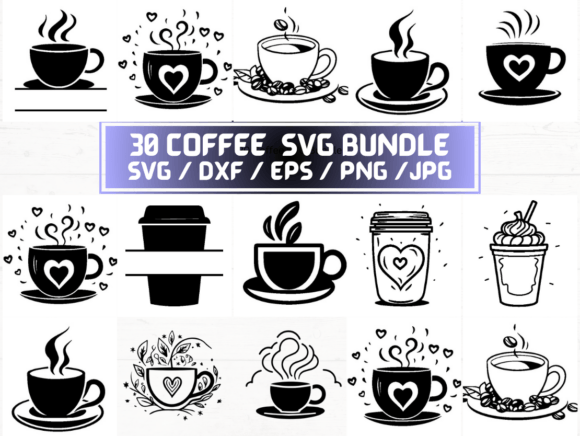
This particular listing delivers a curated set of 30 distinct coffee-themed designs, each provided in five common file formats: SVG, PNG (300 dpi with transparent background), DXF, JPG, and EPS. All files are delivered digitally via instant download in a single ZIP folder—no physical item is shipped.
Who Might Consider Coffee SVG Files?
Individuals exploring Coffee SVG files typically fall into one of several practical categories:
- Home crafters using cutting machines like Cricut or Silhouette to create custom mugs, t-shirts, tote bags, or wall decals.
- Small business owners developing branded merchandise, café signage, or social media assets.
- Graphic designers seeking editable, high-resolution coffee-themed elements for client projects or personal portfolios.
- Educators or content creators assembling printable resources, worksheets, or presentation visuals related to food, wellness, or daily routines.
Interest often arises from a need for ready-to-use, professionally drawn assets—not generic clipart—but designs that retain flexibility across tools and output methods.
Benefits of This Coffee SVG Collection
The inclusion of multiple file types expands compatibility and utility:
- SVG files are native to web browsers and most modern cutting machine platforms, supporting layers, grouping, and embedded styling.
- DXF files ensure broad support across CAD software and older or industrial-grade cutters that don’t accept SVG.
- PNG files at 300 dpi with transparency allow direct use in print layouts, digital presentations, or embroidery digitizing software where vector editing isn’t required.
- EPS files provide backward compatibility with legacy Adobe Illustrator workflows and certain commercial printing systems.
- JPG files serve as quick reference previews or low-barrier options for basic photo editors or social media posts.
Having all five formats means users aren’t forced to convert files themselves—a step that can introduce errors, especially when preserving transparency or path integrity.
Tradeoffs and Practical Considerations
While the breadth of formats is advantageous, it’s important to recognize inherent limitations:
First, this is a digital-only product. There is no physical item, no customer service beyond automated delivery, and no option to preview individual designs before purchase beyond what’s shown in listing images. Users should verify that the visual style—line weight, detail density, and composition—matches their intended application. For example, highly intricate latte art may not cut cleanly on thin vinyl with a hobby-grade machine.
Second, licensing is critical. Unless explicitly stated otherwise in the seller’s terms, these files are typically licensed for personal and small commercial use (e.g., selling up to 200 physical items featuring the design), but not for resale as standalone digital assets or unlimited mass production. Users must review the license included in the ZIP folder or accompanying documentation.
Third, file organization matters. The ZIP contains 150 total files (30 designs × 5 formats). Without consistent naming conventions or subfolders, locating the right version for a specific task may require manual sorting—especially if working across multiple devices or team members.
When This Coffee SVG Set Is a Strong Fit
This collection works well when you need:
- Consistency across outputs—for example, using the same mug icon on a website (SVG), a printed menu (PNG), and a laser-cut wood sign (DXF).
- Time efficiency—when creating multiple coffee-themed products in a short timeframe, and sourcing or designing each asset individually would be impractical.
- Format flexibility—if your workflow involves both web design (SVG), print production (EPS/PNG), and physical crafting (DXF), having all versions pre-converted reduces friction.
- Entry-level accessibility—if you’re new to vector files but want to experiment with layered designs without mastering illustration software first.
It also suits users who prefer predictable, fixed-scope resources over subscription-based libraries or AI-generated alternatives—where output variability and attribution requirements may complicate reuse.
When Alternatives May Be Worth Considering
Consider other options if:
- You need customization beyond scaling or recoloring. While SVG files are editable in vector editors, heavily stylized or compound-path designs may require advanced knowledge to modify meaningfully. In such cases, commissioning an illustrator or using a design service may yield more adaptable source files.
- Your project demands brand-specific typography or integrated illustrations (e.g., a logo combining a coffee cup with your business name in a matched font). Off-the-shelf Coffee SVG sets rarely accommodate bespoke integration without additional design work.
- You’re building a large-scale, long-term library. A one-time purchase offers value for focused needs, but subscription platforms or vector marketplaces may better serve users requiring hundreds of themed assets across categories (e.g., tea, baking, seasonal variants) with ongoing updates.
- You require accessibility compliance (e.g., semantic SVG markup, ARIA labels, or alt-text-ready structures). Most decorative Coffee SVG files lack these features unless explicitly built for web use.
Making a Practical Decision
To determine whether this Coffee SVG collection aligns with your goals, ask yourself three questions:
- What tools will I use? Confirm your primary software or hardware supports the included formats—especially SVG and DXF, which are most relevant for cutting and vector editing.
- What’s my output scale? If producing fewer than 50 physical items annually, the standard license likely suffices. For larger volumes or wholesale distribution, verify usage rights or seek extended licensing.
- How much time do I have to prepare files? If immediate usability matters more than full creative control, this set reduces setup time. If iterative refinement is central to your process, evaluate whether the base designs offer sufficient simplicity or modularity.
Finally, cross-check the preview images against your expected use case. Zoom in on details, check contrast in monochrome applications (e.g., vinyl cutting), and test one file type in your usual workflow before committing to broader implementation.
A Coffee SVG collection like this serves as a functional starting point—not a universal solution. Its value lies in balancing readiness, format coverage, and thematic cohesion for users whose priorities center on execution rather than original creation.