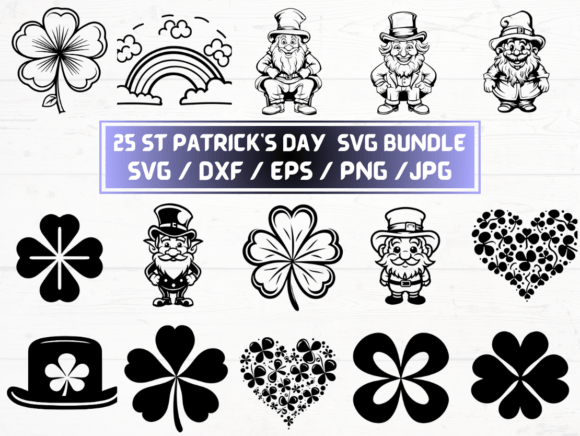
St Patrick’s Day SVG Collection
St Patrick’s Day SVG files are more than festive decorations—they’re versatile, ready-to-use design assets that empower creators to build meaningful, on-brand projects in minutes. This curated collection delivers 25 unique designs across five industry-standard formats: SVG, DXF, EPS, PNG (300 dpi with transparent background), and JPG. Whether you’re cutting vinyl for a café window display, layering graphics into a social media campaign, or prepping print-ready materials for classroom activities, these files give you precision, flexibility, and creative control—without starting from scratch.
Why Format Variety Matters
Having the same design in multiple file types isn’t redundancy—it’s strategic readiness. SVG files scale infinitely for web use and Cricut/Silhouette software. DXF works reliably with laser cutters and CNC machines. EPS preserves vector integrity for professional print workflows in Adobe Illustrator or CorelDRAW. High-resolution PNGs let you drop clean-cut graphics straight into Canva, PowerPoint, or email newsletters. JPGs serve as lightweight backups or quick previews. That means one purchase supports your entire workflow—from concept to physical product to digital share.
Creative Applications Across Audiences
Small business owners can use these St Patrick’s Day SVG files to refresh seasonal signage—think custom door decals for bakeries, embroidered patches for staff aprons, or branded tote bags sold at local markets. A pub owner might layer clover motifs over vintage typography in an EPS file, then send it directly to their printer for coasters. No designer needed—just intention and execution.
Educators and homeschoolers benefit from the clarity and scalability of the PNGs and SVGs. Print clover-shaped flashcards at full size for kinesthetic learning, or import an SVG into a free vector editor to simplify a design for younger students cutting with safety scissors. The transparent backgrounds mean graphics layer cleanly over worksheets, presentation slides, or interactive whiteboard activities—no awkward white boxes breaking visual flow.
Freelance designers and marketers treat this pack as a reliable foundation—not a final solution. Swap colors using global swatches in Illustrator, combine elements across files to build custom banners, or trace and adapt outlines into hand-drawn variations for brand consistency. Because each file is original and cleanly vectored, edits retain sharpness and professionalism—even when resized for Instagram Stories or large-format outdoor posters.
Practical Tips for Consistent, Audience-Friendly Results
Start by auditing your platform requirements. Social posts need PNGs sized for each channel (e.g., 1080×1080 for Instagram feed, 1080×1350 for Reels). Vinyl cutting demands SVG or DXF with clean paths and no overlapping strokes. For printed merchandise, open EPS files in vector software to confirm fonts are outlined and colors are CMYK-ready.
When adapting designs for different audiences, consider tone and context. A playful leprechaun hat SVG works well for kids’ party invitations—but swap in minimalist line-art clovers and muted greens for a wellness brand’s St Patrick’s Day email campaign. Use the included JPGs as mood-board references while building your own color palettes; avoid defaulting to oversaturated “shamrock green” unless it aligns with your brand voice.
Keep files organized from day one. Rename each SVG with its core element and style—for example, clover_outline_modern.svg or pot_of_gold_flat.svg. Store them in a dedicated “Seasonal > March > St Patrick’s Day” folder in your cloud drive. Tag them in your asset management tool if you use one. Clarity here saves time later—especially when clients ask for “that green icon we used last March.”
Ideas That Go Beyond the Obvious
- Interactive classroom tools: Import SVGs into Google Slides, then animate individual layers (e.g., make coins “drop” into a pot during a math lesson about counting by fives).
- Local event branding: Combine three SVG clovers into a repeating pattern, export as a seamless tileable PNG, and apply it as a subtle background for city-sponsored parade flyers.
- Product packaging mockups: Place a high-res PNG over a 3D bottle template in Photoshop to preview how a limited-edition soda label would look—before committing to a print run.
- Content repurposing: Turn one detailed SVG into five simplified versions using Illustrator’s Simplify tool—then use each variation across blog headers, Pinterest pins, email footers, podcast show notes, and LinkedIn banners.
What Makes This Collection Stand Out
It’s not just volume—it’s intentionality. Each of the 25 designs avoids clip-art clichés. You’ll find balanced negative space for clean cutting, consistent stroke weights for legibility at small sizes, and thoughtful proportions that hold up whether stitched onto fabric or projected on a gymnasium wall. There are no rasterized effects masquerading as vectors, no embedded fonts that break on other systems, and no hidden layers that cause confusion in cutting software.
The instant download means no waiting, no shipping delays, no inventory tracking. You get what you need—when inspiration strikes or deadlines loom. And because it’s digital-only, there’s zero environmental footprint from production or delivery. That aligns with values many creators now prioritize: efficiency, ethics, and ease.
Getting Started Is Simple
Download the ZIP folder. Extract it. Open the format that matches your tool: SVG for Cricut Design Space or Figma, DXF for LightBurn or Inkscape, EPS for commercial printers, PNG for Canva or Keynote. Adjust size, recolor, group elements, or isolate parts—then export or cut. If you’re new to vector files, start with one PNG and one SVG: place both side-by-side in your editor to see how scaling affects quality. Notice where edges stay crisp—and where pixelation begins. That hands-on comparison builds confidence faster than any tutorial.
St Patrick’s Day SVG assets work best when they serve a purpose—not just decorate. Let them support your goals: clearer communication, stronger engagement, smarter workflows, or more joyful making. They’re tools, not trends. Use them deliberately. Adapt them thoughtfully. And keep the focus where it belongs—on the people who’ll see, use, or experience what you create.