Giraffe SVG: A Practical Asset for Design, Production, and Creative Workflow Integration
When you're assembling assets for a craft project, preparing marketing visuals, or building educational materials, file compatibility and format flexibility directly impact how quickly you move from concept to execution. The Giraffe SVG collection is designed to support that transition—not as a standalone novelty, but as a functional component in repeatable, scalable workflows.
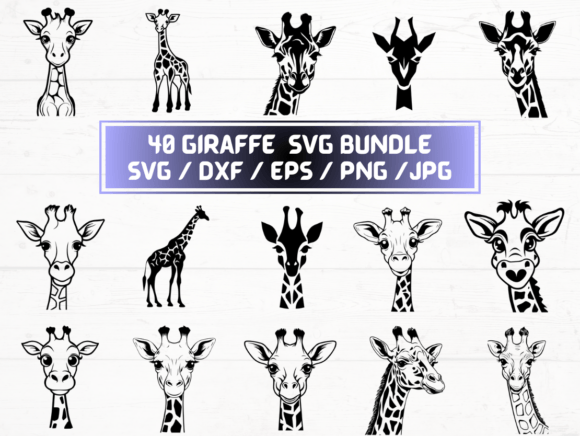
This digital package delivers 40 unique giraffe-themed vector and raster files across five industry-standard formats: SVG, DXF, EPS, PNG (300 dpi with transparent background), and JPG. Each variant serves a distinct role depending on your tools, output medium, and stage of work. Understanding how and when to use each format—rather than treating them as interchangeable—makes the difference between smooth implementation and unnecessary rework.
Where Giraffe SVG Fits Before You Begin a Project
Preparation starts long before cutting vinyl or exporting a presentation slide. If you're planning a themed classroom activity, launching a children’s product line, or designing custom apparel, having vetted, production-ready assets early avoids last-minute format conversions or quality compromises. The Giraffe SVG set lets you lock in visual consistency at the planning stage: choose a silhouette for laser-cut wooden toys, preview color variations using the transparent PNGs, or test layout proportions in your design software—all without waiting for custom illustration or licensing approvals.
Because all 40 designs are included in every format, you’re not forced to commit to one tool or platform upfront. That flexibility supports parallel exploration: sketching in Adobe Illustrator with EPS files while prototyping physical cuts in Cricut Design Space using SVG or DXF. It also reduces vendor dependency—you don’t need to coordinate with a designer every time you adjust size, orientation, or layer order.
Using Giraffe SVG During Execution—Format by Function
Execution isn’t one-size-fits-all. Your choice of format depends less on preference and more on technical requirements:
- SVG works natively in web-based editors (Cricut, Silhouette Studio, Canva) and modern browsers. Use it for responsive web graphics, interactive e-learning modules, or browser-based mockups where scalability and small file size matter.
- DXF is essential for CNC routing, laser engraving, and CAD-integrated fabrication. Its precise vector paths ensure clean cuts on wood, acrylic, or leather—no pixelation, no guesswork.
- EPS remains the most reliable print-ready vector format for professional offset printing or large-format signage. It embeds fonts and preserves layers for prepress teams.
- PNG (300 dpi, transparent background) gives you high-resolution raster versions ready for presentations, social media banners, or printed handouts where fine detail matters more than infinite scalability.
- JPG offers lightweight, universally supported versions ideal for email templates, internal documentation, or quick client previews where transparency or editing isn’t required.
Having all five formats means you rarely need to convert files mid-process—which eliminates rounding errors, unintended anti-aliasing, or broken transparency. For example, if you start with an SVG in Cricut Design Space and later decide to adapt the same giraffe for a printed brochure, switching to the EPS or high-res PNG takes seconds—not a trip back to Illustrator to re-export.
Integration Across Tools and Teams
Real-world projects rarely live inside a single application. A small business owner might use the SVG for website icons, the DXF for custom packaging prototypes, and the PNGs in Instagram Stories—all sourced from the same ZIP folder. Educators can drop transparent PNGs into Google Slides for animal-themed lessons, then reuse the EPS version in printed flashcards. Freelancers building brand kits for clients include the EPS and SVG variants so both marketing and production teams get what they need—without follow-up requests.
This interoperability reduces friction between roles. A graphic designer doesn’t need to explain why their SVG won’t cut properly on a Glowforge—the DXF is already there. A marketer doesn’t have to ask for “a version without the background”—the PNG delivers it out of the box. That alignment saves time, minimizes miscommunication, and reinforces consistency across touchpoints.
Organization and Long-Term Usability
A well-structured digital asset library pays dividends over months and years. The Giraffe SVG collection uses consistent naming (e.g., giraffe-standing-front-view.svg, giraffe-standing-front-view.png) and groups related variants together—making it easy to locate, compare, and batch-process files. No renaming, no guessing which file matches which orientation.
For long-term use, consider how you’ll maintain these assets. Store the original ZIP in a cloud-synced folder with clear version notes. Create subfolders by use case—/crafting/dxf, /web/svg, /print/eps—so team members or future-you can navigate intuitively. If you modify a file (e.g., recoloring a PNG), save the edited version separately rather than overwriting the original. That preserves fidelity for future adjustments.
Quality Control Without Extra Steps
Each file in the Giraffe SVG set is built to meet baseline production standards: vectors are cleanly closed and optimized (no stray anchor points), PNGs render crisply at 300 dpi with alpha transparency preserved, and JPGs use sRGB color space for predictable on-screen display. That means fewer surprises during print proofs, fewer failed cuts due to open paths, and fewer revisions because a background didn’t isolate correctly.
You still need to verify output—but verification becomes faster. Test one SVG in your cutting machine, confirm alignment and scale, then apply those settings across the rest. Spot-check one EPS in your RIP software, then trust the others for similar jobs. That consistency lowers cognitive load and supports repeatable, auditable results.
Workflow Examples in Practice
Example 1: Small Business Product Launch
A boutique toy maker plans a safari-themed wooden puzzle line. They import the DXF files directly into LightBurn for laser-cutting templates, use the SVGs to build animated unboxing videos in After Effects (via Lottie), and drop the PNGs into Shopify product pages and Pinterest ads. All assets share the same proportions and stylistic cues—no mismatched scaling or inconsistent linework.
Example 2: Educator Building Themed Curriculum
A third-grade teacher creates a unit on African wildlife. They insert transparent PNGs into Google Docs for student handouts, copy SVG code into HTML-based interactive quizzes, and print the EPS versions onto cardstock for laminated sorting games. Because all formats align visually, students recognize the same giraffe across mediums—reinforcing learning through repetition, not confusion.
Example 3: Freelance Designer Delivering Brand Assets
A designer packages a logo suite for a new children’s app. Alongside custom typography and iconography, they include the Giraffe SVG collection as supplemental illustrative elements—ready for UI developers (SVG), app store screenshots (PNG), and investor pitch decks (JPG). The client receives immediate utility, not just source files.
Making It Last: Updates, Backups, and Scalability
Digital assets depreciate only when they’re disorganized, outdated, or incompatible. The Giraffe SVG collection avoids obsolescence by supporting current and widely adopted standards—not niche or deprecated formats. As software updates, the SVG and PNG files remain usable; DXF stays compatible with evolving CNC firmware; EPS continues to serve commercial printers reliably.
Back up the ZIP folder in at least two locations—one local, one cloud-based—and note the purchase date and version number in your asset log. If you later acquire additional animal-themed sets, use the same naming logic (lion-svg.zip, elephant-svg.zip) to keep your library scannable and searchable.
Finally, treat this not as a one-off download, but as infrastructure. Like a well-chosen font family or a standardized color palette, it’s a reusable foundation—not for every project, but for the ones where speed, reliability, and visual cohesion matter most.