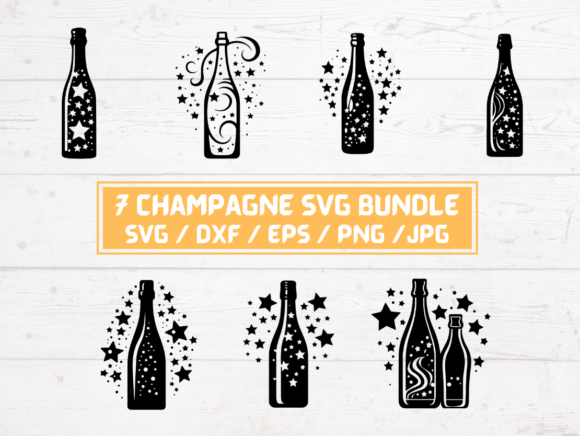
4 Champagne Bottle SVG Bundle
Designing for celebrations—whether for a client’s luxury brand launch, a wedding planner’s social media campaign, or a small business owner’s seasonal promotion—requires assets that convey elegance, clarity, and consistency. The 4 Champagne Bottle SVG Bundle meets that need precisely: four professionally crafted, production-ready vector files representing champagne bottles in distinct yet cohesive styles, each delivered with full format support for immediate use across platforms and workflows.
This isn’t decorative clutter—it’s purpose-built digital infrastructure. Each bottle is designed with clean paths, balanced proportions, and intentional negative space, making them adaptable to both large-format printing and pixel-perfect web display. Because the bundle includes SVG, DXF, EPS, PNG (300 dpi, transparent background), and JPG files, it bridges creative, technical, and operational needs without requiring conversion, rework, or compromise.
Where It Fits in Your Workflow
The 4 Champagne Bottle SVG Bundle integrates most effectively at three natural inflection points: preparation, execution, and refinement. Before starting a project—say, designing an invitation suite or building a product landing page—you’ll often spend time sourcing, vetting, and organizing visual assets. Having these four bottles pre-validated for scale, color separation, and layer integrity reduces that upfront friction significantly. You’re not hunting, tracing, or editing; you’re selecting, placing, and iterating.
During execution—whether in Adobe Illustrator, Cricut Design Space, Silhouette Studio, Canva, or even Figma—the SVG and DXF files retain crispness at any size and respond predictably to fills, strokes, and clipping masks. That reliability means less troubleshooting mid-design and more focus on layout, typography, and messaging. For example, a marketer preparing Instagram carousel posts can drop one bottle into a mockup, adjust its opacity and hue to match brand guidelines, and duplicate the treatment across slides—all without quality loss or rendering delays.
In the refinement phase, having multiple stylistic options (e.g., minimalist line art, detailed engraved silhouette, top-down label view, and angled pour shot) allows for intentional variation—not repetition. You might use the line-art version for a monochrome email header, the detailed version for a printed menu, and the angled version for a website hero banner. That kind of controlled diversity strengthens visual storytelling while maintaining brand coherence.
Compatibility and Cross-Platform Use
SVG files work natively in modern browsers and design tools that support vector import—including Figma, Affinity Designer, Inkscape, and web-based editors like Gravit Designer. DXF files ensure compatibility with CNC routers, laser cutters, and vinyl plotters, making the bundle useful beyond screen-based design. EPS remains relevant for legacy print workflows, especially where CMYK separation or spot-color handling is required. PNGs (300 dpi, transparent background) serve as reliable fallbacks for platforms that don’t render vectors well—like certain email clients or older CMS templates—while JPGs provide lightweight options for web previews or documentation.
This breadth eliminates bottlenecks. A freelance designer delivering files to a printer doesn’t need to generate separate EPS exports. A teacher creating classroom celebration materials can open the PNG directly in Google Slides. A craft entrepreneur prepping for a holiday market can load the DXF into their cutting software and test-fit the bottle shape onto a custom acrylic coaster template—all within minutes.
Practical Implementation Tips
Organize by use case, not file type. Instead of storing all SVGs in one folder and all PNGs in another, create subfolders named after common applications: Print & Packaging, Digital Marketing, Craft & Cutting, Social Media Templates. Drop the appropriate file variant into each—this saves time when you’re under deadline pressure and need to grab “the bottle that works for vinyl” without scanning through five formats.
Test scaling early. Even high-quality SVGs can behave unexpectedly when nested inside complex CSS layouts or constrained containers. Open one file in your target environment—be it a WordPress theme builder or a Cricut project canvas—and scale it from 10% to 200%. Watch for stroke thickness inconsistencies or unintended path flattening. If issues arise, the EPS or high-res PNG offers a stable alternative without sacrificing fidelity.
Preserve editability. When recoloring or modifying a bottle in Illustrator or Inkscape, avoid expanding appearances unless necessary. Keep strokes live, text unconverted, and layers labeled (e.g., “Bottle Body,” “Foam Detail,” “Label Area”). That preserves flexibility if the asset needs repurposing later—for instance, adapting the same bottle for a non-alcoholic sparkling cider campaign by swapping label copy and adjusting color tone.
Use transparency intentionally. The included PNGs feature transparent backgrounds, but that doesn’t mean they should always sit on white. Test them over gradients, textures, or photography. A champagne bottle over a blurred gold foil background reads differently than over a marble texture—both valid, but each serving a specific mood. Save variations as layered PSDs or Figma components for rapid A/B testing.
Long-Term Usability and Quality Control
Because this is a digital download—not a subscription or cloud-hosted asset—you retain full control over versioning, backups, and permissions. Store the ZIP in your master resources library with a clear naming convention: ChampagneBottle_Bundle_v1_2024. Include a simple README.txt listing each file’s intended use (e.g., “bottle_03_dxf – optimized for 0.5mm kerf laser cutting”) so future-you—or a teammate—can act without guesswork.
Quality control starts with verification: unzip the folder, open each SVG in a browser, and confirm no stray anchor points or embedded raster elements exist. Then check one PNG at actual size in Photoshop or Preview—zoom to 400% to verify edge smoothness and transparency integrity. If everything renders cleanly across devices and apps, you’ve confirmed baseline readiness. From there, treat the bundle like reusable infrastructure: update usage logs, note which variants get used most, and archive outdated versions rather than deleting them outright.
Real-World Integration Examples
- A small-batch winery uses the detailed SVG bottle to build consistent label mockups for new vintages—swapping in different grape illustrations and vintage years while keeping the bottle shape identical across all SKUs.
- A freelance event designer imports the DXF file into LightBurn to etch champagne bottle silhouettes onto glassware for a corporate gala—scaling precisely to fit 8 oz flutes without distortion.
- An educator inserts the line-art PNG into a Canva worksheet about symbolism in advertising, then duplicates it to annotate parts of the image (e.g., “curved neck = tradition,” “foil wrap = premium cue”) using built-in drawing tools.
- A blog publisher adds the angled bottle SVG to a newsletter header alongside a headline like “5 Ways to Celebrate Milestones Without Spending Big”—using the visual as an emotional anchor rather than literal illustration.
The 4 Champagne Bottle SVG Bundle doesn’t replace strategy or skill—it supports them. It removes friction between intention and output, letting creators focus on meaning, audience, and impact instead of format compatibility or pixel alignment. When your workflow depends on speed, consistency, and adaptability, having four refined, production-tested champagne bottle assets—delivered instantly, with no shipping, no wait, no ambiguity—isn’t convenience. It’s leverage.